Analog IO
Overview
This lab is a simple introduction to reading and outputting analog signals over the ESP32/Arduino pins. Please note that if you use an Arduino, you would have to use analog specific pins. If you want to challenge yourself, try completing the objectives below in order before referring to the example code!
Objectives
- Read analog values from photoresistor
- Turn on LED or print something whenever the light level drops below a threshold
- Add a delay so that the light level has to be below a threshold for a certain amount of time before the LED is turned on ⭐︎
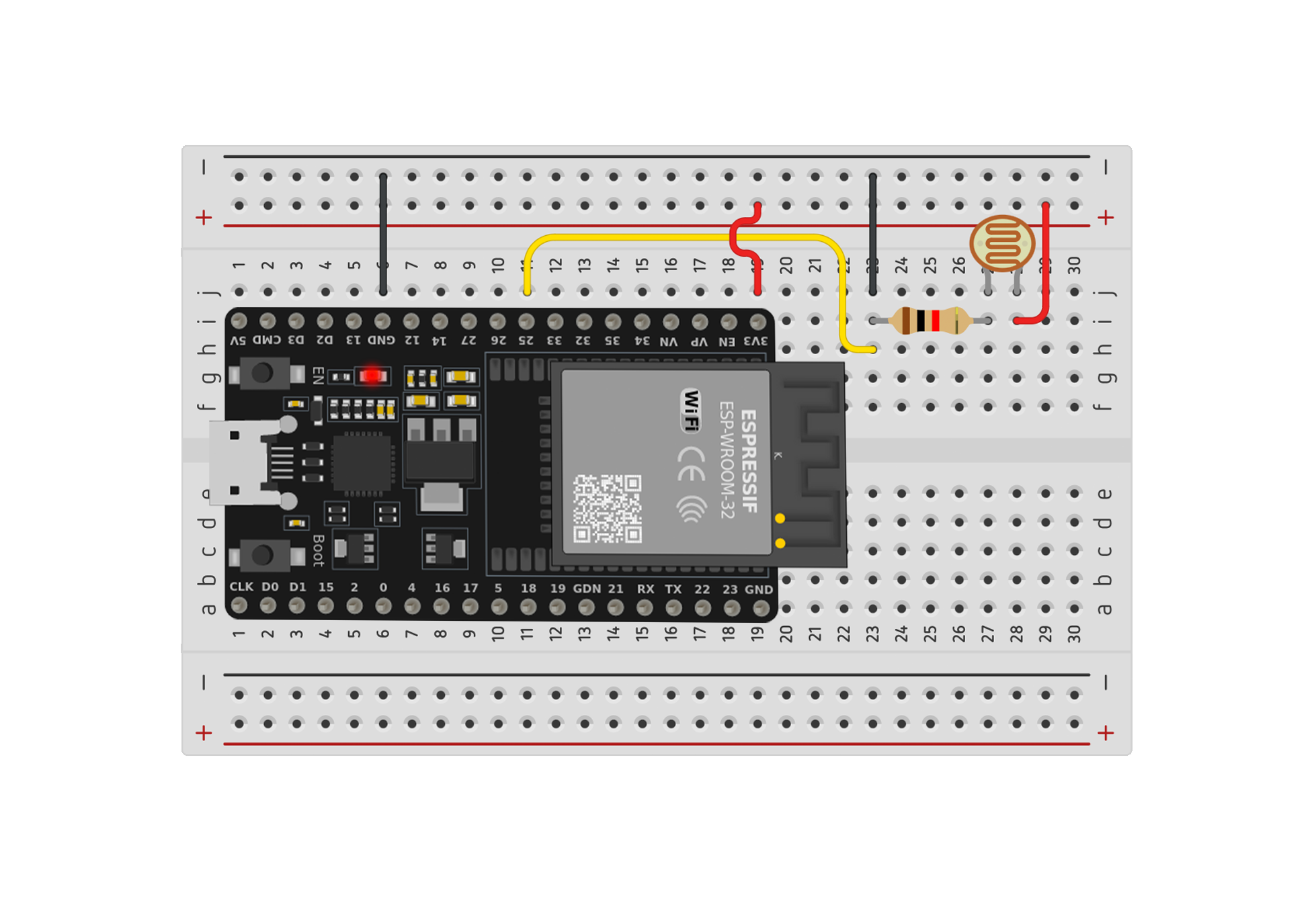
Wiring Diagram
Code Solutions
- Basic
- Advanced
#include <Arduino.h>

#define PHOTORESISTOR_PIN D25   // Defining photoresistor pin number
#define LED_PIN 15              // Defining LED pin number

long minLightLevel = 1000;      // Defining low light threshold

void setup() {
    Serial.begin(115200);       // Initializing Serial with a baud rate of 115200
    pinMode(LED_PIN, OUTPUT);   // Setting pin mode of LED pin to output
}

void loop() {
    long lightLevel = analogRead(PHOTORESISTOR_PIN);    // Reading photoresistor pin as analog. This will return a numerical value
    Serial.println(lightLevel);                         // Printing light level to serial

    // Checking if light level is below threshold
    if (lightLevel < minLightLevel) {
        digitalWrite(LED_PIN, HIGH);    // Setting LED state to on
    } else {
        digitalWrite(LED_PIN, LOW);     // Setting LED state to off
    }
}
#include <Arduino.h>

#define PHOTORESISTOR_PIN D25               // Defining photoresistor pin number
#define LED_PIN 15                          // Defining LED pin number

long minLightLevel = 1000;                  // Defining low light threshold
long lowLightTimeout = 5000;                // Defining LED timeout time
long lastTimeAboveThreshold = millis();     // Creating variable for storing timestamp for last time the photoresistor was above the threshold
bool ledState = false;                      // Creating variable for storing LED state

void manageLED();

void setup() {
    Serial.begin(115200);                   // Initializing Serial at 115200 MHz
    pinMode(LED_PIN, OUTPUT);               // Setting pin mode of LED pin to output
}

void loop() {
    manageLED();
}

void manageLED() {
    long lightLevel = analogRead(PHOTORESISTOR_PIN);    // Reading photoresistor pin as analog. This will return a numerical value
    bool prevLEDState = ledState;                       // Saving previous led state in temporary variable

    // Checking if light level is above threshold
    if (lightLevel > minLightLevel) {
        lastTimeAboveThreshold = millis();              // Updating last time above threshold timestamp
        ledState = true;                                // Setting LED state to true

    // Checking if its been longer than timeout threshold since the light level was last above threshold. Also checking that the LED state is true.
    } else if (((millis() - lastTimeAboveThreshold) > lowLightTimeout) && ledState) {
        ledState = false;                               // Setting LED state to false
    }

    // Checking if LED state has changed since last tick
    if (prevLEDState != ledState) {
        digitalWrite(LED_PIN, ledState ? HIGH : LOW);   // Setting LED to LED state
    }
}
note
The basic example code does not include a solution for the 3rd objective